
14.9.5
December 20, 2021
- Visual issue with email field on the login screen
14.9.4
December 17, 2021
- Content progress wasn't being applied to lessons consistently
- Changing program status within an Accreditation
14.9.3
December 15, 2021
- Share Message Add-on
- With the add-on enabled, learners can provide more context with a written message when sharing content, a folder, or a scenario response. The message will be visible via email, push notification, and in-app notification.
- Authored content answer keys weren't saving points during the creation process
- Visual bug on the login screen
- The display order for featured content on the dashboard wasn't consistent
- Accreditation forms were not saving correctly
- Placeholder text update for instructor notes field
14.9.2
December 8, 2021
- The announcements table has been updated to account for responsiveness and accessibility (we will continue to update other tables throughout the app over time)
- Bulk assignment actions such as changing the due date weren't completing
- Bulk selecting content when cross-tenant sharing
14.9.1
December 2, 2021
- New navigation UI in the profile dropdown
- Certification Report
- This report provides progress for any certifications in the system
- Device Usage Report
- This report shows how many users in each group have logged in on web or mobile in a certain time frame.
- An Instructor Notes field has been added to the Content Inventory Report
- The help icon now routes the user directly to the help center homepage
- Website URL character limits have been increased
- Images in announcement emails have been reduced in size
14.9.0
November 18, 2021
- Instructor Notes
- When creating content, admins have the option to provide coaching instructions for how learners should be interacting with the content. This is available for a coach to reference when reviewing learner completions.
14.8.9
November 15, 2021
- Veeva Vault content was not being added to the app after a success message was displayed
14.8.8
November 11, 2021
- Selecting a group in the assignments table filter always closed the filter prematurely
- Truncation for content descriptions in the Appears In table
14.8.7
November 10, 2021
- Deleted Veeva Vault content was still appearing as added to the app
14.8.6
November 8, 2021
- Learners were able to interact with archived scenarios and courses within a lesson
- Accreditation programs could not be created
- Approved accreditation programs were not displaying values in each answered field
14.8.5
November 4, 2021
- Non-super admins couldn't access the Groups tab. It is now restricted to their permissions (people and content admins)
- Workflows had stopped running. This update will retroactively assign those that were missed while the job was not functioning.
14.8.4
November 2, 2021
- Erroneous success status when attempting to add a content variant file that wasn't the same type as the main item
- The recommended learning table in Echospan wasn't showing the expired indicator
- Program details in an accreditation were not loading
14.8.3
October 27, 2021
- Minor visual issues in the detail panels for content
- Cross-tenant shared content wasn't being displayed in Echospan competencies
14.8.2
October 26, 2021
- In app toast notifications are being sent again
- Removed the share action for assigned scenario responses
14.8.1
October 22, 2021
- Two tag reports that provide content counts and associations
- Enrollment details missing in certain instances and progress indicators had incorrect values
- The overdue tooltip was displayed inaccurately in the new assignment tables
- Upcoming assignments notifications were being sent when a date in the past was selected when assigning
14.8.0
October 19, 2021
- We've made several updates to the app when it comes to viewing assignments and learning records as an admin and coach. These updates include consolidating tabs, aligning statuses and filters, reintroducing search, and improved processing speed in the tables.
- The Announcements table is now sorted by most recently modified
- The override button for admins is accessible again
- The override tooltip when viewing an enrollment was rendering in the wrong location
- Reordering multiple choice options in authored content
- Select all when selecting groups
- Echospan - Templates were displaying additional blank pages
14.7.4
October 14, 2021
- Echospan - Last Assigned date was displaying content created date on the learner side of the app
- Echospan - Mapping content was resulting in additional blank pages in the competency table
14.7.3
October 12, 2021
- Echospan - A resync action has been added to the project competency mapping table
- Some scenario background videos were only loading the audio
- Searching partial strings associated to tags
- Moving folders from move action in the table view
- Echospan - Using the resync action in the project table resulted in shimmer state that never reloaded the data
- Echospan - tables have been swapped to paginated from infinite scroll
14.7.2
October 7, 2021
- The Workflows groups table is searchable again
- The Workflows table correctly lists the groups associated
What's fixed for Mobile
- Coaches were inadvertently creating enrollments for users when viewing their lesson or learning path
14.7.1
October 6, 2021
- If answered quickly, multiple choice answers, in authored content, were not always recorded correctly
- Echospan project imports weren't tracking correctly
14.7.0
October 5, 2021
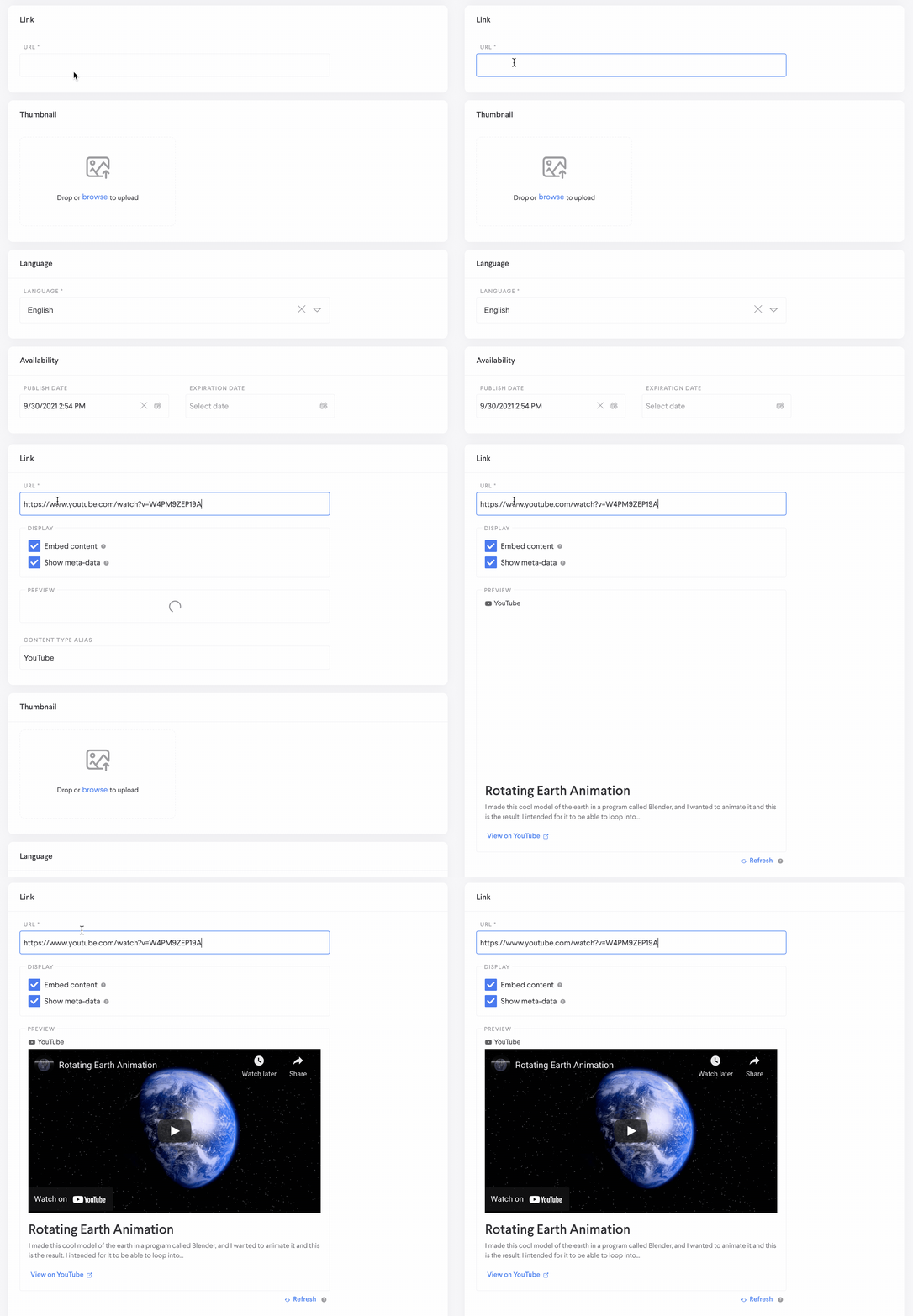
- When creating a website, the app will now check to see if the URL being added can be embedded as well as show available metadata from that site. This information is determined by the hosting site and Loop will display what is available.
- An SSO filter has been added to the Admin > People table
- Tooltips were occasionally displayed off screen
- Reordering authored content fields while editing
- No people were selectable when attempting to share a scenario response
14.6.7
September 27, 2021
- The authored content dropdown type was not applying the option being selected
- Authored content wasn't retaining answers after leaving and returning
- Small visual issues
14.6.6
September 24, 2021
- Some reports weren't running successfully
- New Learners Only option (when assigning) is now only checking to see if the content has been assigned previously, without looking at the content version
14.6.5
September 23, 2021
- Custom fields (People) have been added to the Assignment Content Report
- Some minor visual issues
14.6.4
September 21, 2021
- Improved responsiveness for viewing content in the External viewer on mobile devices
- Featured Content table sort was changing unexpectedly when paginating or increasing table count
- Content Inventory Report returns content from subfolders if a parent folder is selected
14.6.3
September 16, 2021
- Two authored content reports
- An answer report that provides a list of all fields associated with an authored content item as well as who has responded and their answers.
- A score report that provides authored content completion records including passing thresholds, scores, and a pass fail status if quiz functionality has been enabled.
- Content Hierarchy report detailing learning paths and lessons and all associated nested content
- Badge Overview Report
- A new tag component available in the Upload File form
- SSO users are correctly navigating to in app links after logging in (was reverted temporarily)
- Multi-select when assigning content
- Several small visual updates
14.6.2
September 14, 2021
- Admins can filter by content when selecting items during the assign workflow
- Send Notification toggle when assigning content
- Default is set to enabled. Disabling will not result in not sending a notification when the content is assigned
- Performance issues due to how translations were being bundled and requested
- Enrollment details weren't being displayed for content within a lesson
- Announcement table sort was changing unexpectedly when paginating or increasing table count
- Searching the tag table when in edit form
- Non super admins were seeing blank badge and certification tables within user details
- Recorded assignment responses were visible in public scenarios via the content tab
14.6.1
September 13, 2021
- Blank pages being displayed for some SSO users
14.6.0
September 9, 2021
- The authentication page will fallback to the tenant's app logo if no wordmark is available
- Echospan integration
- This add-on integrates Echospan projects and assessments into Loop, pulling in project competencies, and learner assessments including their scores and comments.
14.5.4
September 9, 2021
- Authored content dropdown answers are now wrapping
- SSO users are correctly navigating to in app links after logging in
- Multiple scenario issues including document actions and video display
14.5.3
September 8, 2021
- A redesigned authentication page that includes improved workflows for reset password and SSO, as well as better error messaging. The page is also fully responsive and accounts for accessibility needs.
- You can now filter the badges learner progress table by status
- Badge Overview report for details on badges in the app and how many learners have earned it
- Coaches will receive a notification when an assignment that requires review has been submitted
- Course retake scores and statuses weren't being applied depending on the size of the course quiz
- The assigned learners table is back to the correct width
14.5.2
August 31, 2021
- If a message is added when assigning, that information will be displayed in the assignment email
- Badge progress report
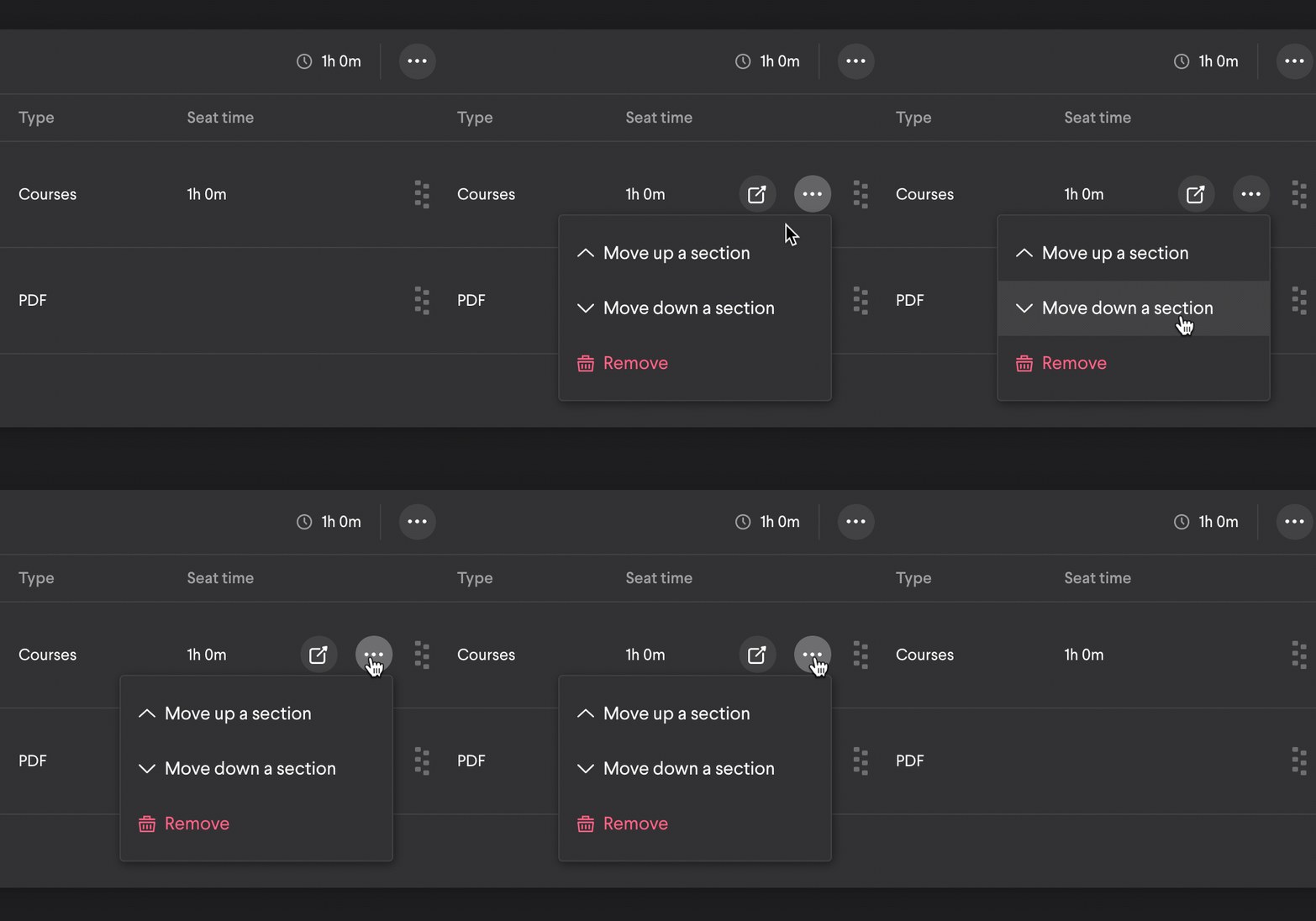
- Moving content between lesson sections
- Roleplay recordings were sometimes failing to save
- The empty state for the learner assignments page
- When cross-tenant sharing, selecting multiple content items to share was failing
- The learner view wasn't scrolling when viewing the content associated to a badge
- Searching a learners certifications as an admin
- Website alias is now displaying in all locations that it is visible
14.5.1
August 26, 2021
- As a coach you can now filter down to your team when sharing content
- Admins can download a thumbnail (content, folder, announcement) when in the edit form
- Content thumbnails can also be downloaded from the detail form
- Selecting download will open a new tab where you can then save the image
- Viewing content in the external viewer on a mobile device
- Deleting a tag from the tag details as a non-super admin
14.5.0
August 24, 2021
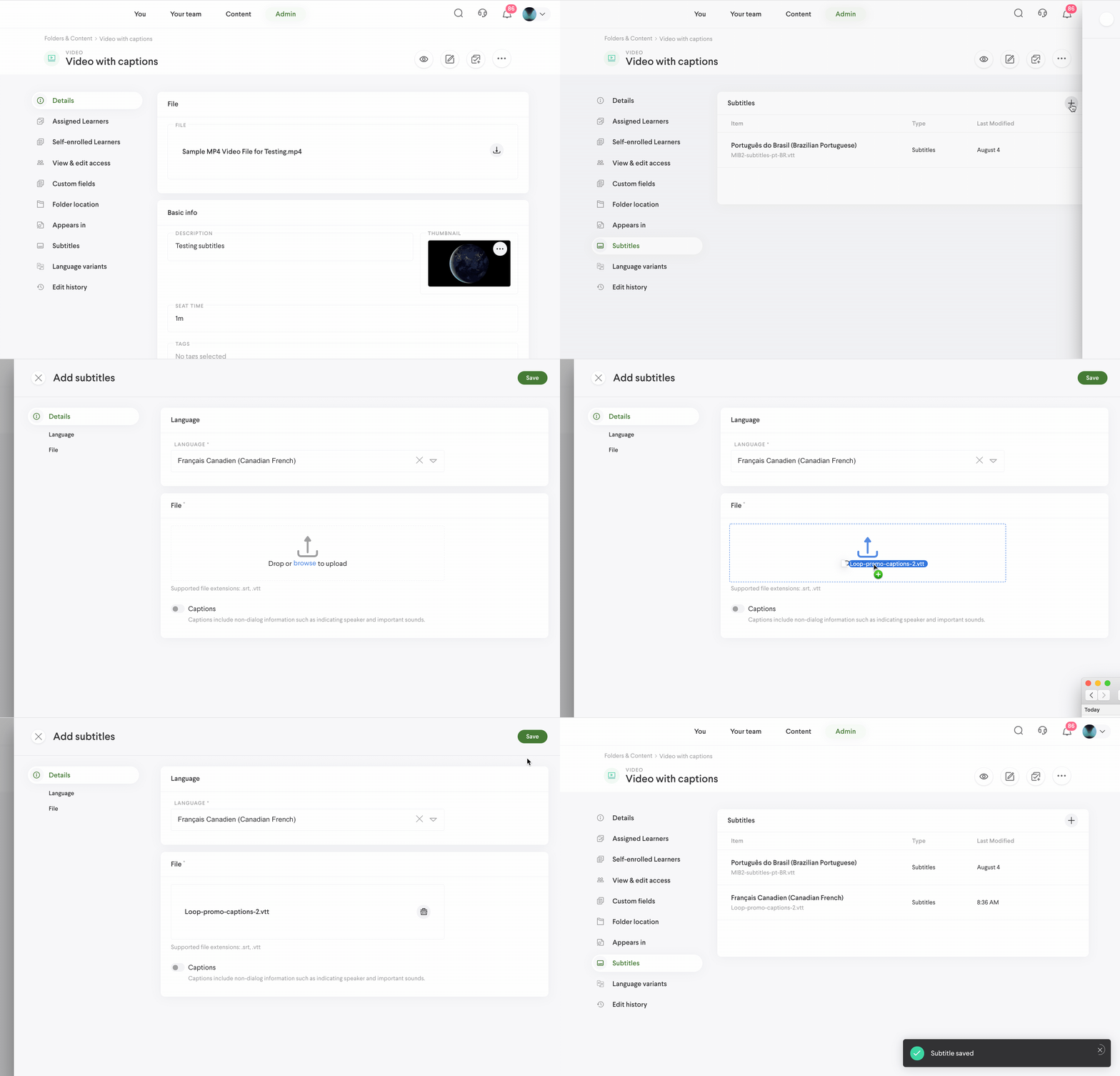
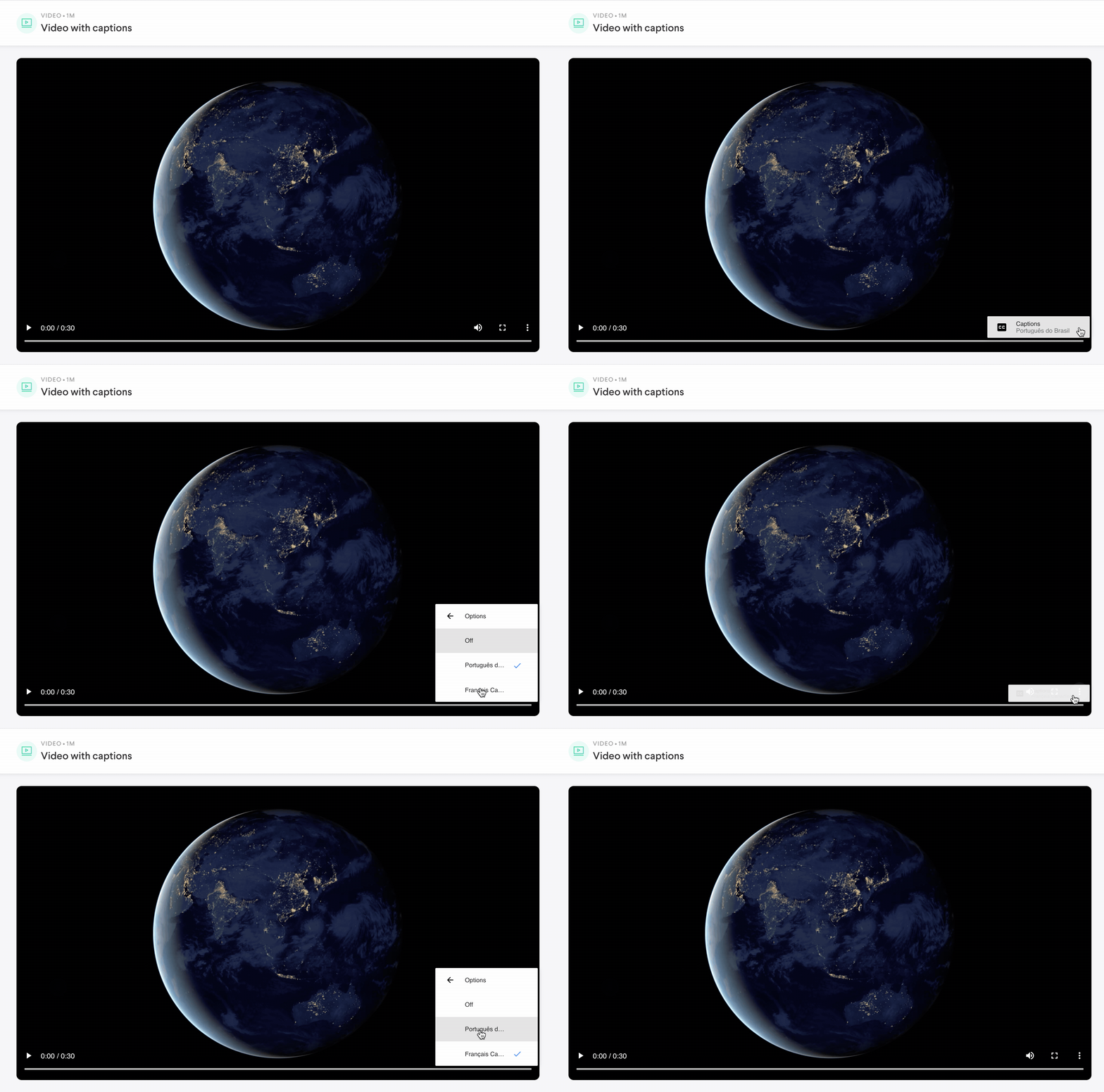
- Subtitles/captions for videos
- .srt or .vtt files can be added to videos in multiple languages. Learners can select a language to view written text while the video plays.
- Learning Path progress in the learner view
- Some button error states have been corrected
- Numeric input type arrows are working again
- Tag table empty state action
- Videos weren't always playing in external viewer
- Tabs were out of sync when viewing a user as an admin
- Content banner titles were slightly truncated
- Drag and drop for thumbnails
- Alias table was not loading
- Tag and folder chips in a lesson are routing as expected again
14.4.4
August 16, 2021
What’s fixed for web
- Elastic issues have been resolved
14.4.3
August 12, 2021
- Assignment Reminder add-on. Enabling this add-on will send a weekly email to all users that have overdue assignments. The email will highlight the most recent overdue item as well as tell the user how many there are in total.
- Some button error states have been corrected
- Numeric input type arrows are working again
- Russian translation corrections
What's fixed for Mobile
- Email notifications are directing users to the correct location in the app
- A single submit modal is displayed when completing an assignment
- The Content page is loading consistently again
- Russian translation corrections
14.4.2
July 26, 2021
What’s fixed for web
- Course registrations with DMS
- Announcement and banner text trunctation
- Program list in an accreditation detail wasn't infinite scrolling
- Create or edit content if it contains tags or a folder location
14.4.0
July 8, 2021
- Creating an announcement with a description
- Rich text display on scorable items in a leaderboard
- Routing to content if they're associated to Veeva Vault
14.3.0
June 29, 2021
- You can now download content within a lesson without view access to the nested item
- SSO authentication issues
- Some input blocks in authored content weren't functioning as expected
- Moving folders from the folder table
What's fixed for Mobile
- Coaches can view scenario responses again
14.2.0
June 16, 2021
- Additional input types have been added to authored content. These include; short answer, date, email, numeric, phone number, address, acknowledgement, and file upload.
- Authored content responses now display correctly in enrollment details
- Infinite scroll works again in the Move folder selection dialog
- Coaching assignment workflow is limited to your learners
- Your Team is correctly displaying only your learners
What's new for Mobile
- Additional input types have been added to authored content. These include; short answer, date, email, numeric, phone number, address, acknowledgement, and file upload.
What's fixed for Mobile
- Universal links within a PDF weren't routing correctly
14.1.0
June 9, 2021
What’s fixed for web
- Miscellaneous bug fixes
14.0.0
May 24 2021
- Certifications have been enhanced. Choose from existing templates or upload your own to create a certification that can be obtained by completing one to many content items. You can also choose not to add any criteria and award it manually.
- Cross-tenant sharing allows a Super admin to share content with another tenant in which they are a super admin.
- Website and Authored content aliases are now displaying correctly
- Coaches without admin permissions can unassign
- Associating groups to content and users while using a slower network connection
What's new for Mobile
- You can now view your certifications in a new tab within your profile. You can see all certifications you have earned and those you have access to complete.
What's fixed for Mobile
- Universal links now route correctly when initially logged out of the app
- Scenario responses longer than 2 minutes save correctly
- Changing language variants on content within a lesson
13.1.0
May 13 2021
- Announcement emails now contain the announcement card itself to provide more visibility for the high visibility content created in the app. The previous release added the notification function to the Assignment creation form.
- Admins can now generate a report and navigate away while the request processes. A notification will be sent when a report is ready for download.
- The navigation tabs in the content form were out of sync or missing at times when the page loaded
- The edit button in the Admin>content table is accessible again when it should be
- The assign dialog now contains the last name of the assignees
13.0.0
April 27, 2021
- A new authored content building experience which includes the tools necessary to create surveys and quizzes. Options include determining passing threshold, correct/incorrect answer feedback, hiding answers, and weighting questions with a point value.
- Admins can now choose to send in-app and email notifications when an announcement is published. This is available in the announcement form when creating/editing.
- Breadcrumb navigation has been added to the admin screens for additional context on current location
- Content preview is now a main action when viewing content details as an admin (look for the eye icon next to edit)
- View Access filters have been added to selection dialogs to assist with narrowing down results when creating things like announcements, banners, lessons, etc.
- Infinite Scroll fixes app-wide
- All languages are visible in the profile's language picker
- Some admin tabs were out of sync depending on the add-ons that were enabled
- Content admins can again edit folders they created
- You will no longer see collections without content items on the learner dashboard
What's new for Mobile
- When completing authored content you may now see passing thresholds, correct/incorrect answer feedback, and point values on questions.
- Push notifications can be enabled. In doing so, you will receive notifications for things like new assignments, content that's been shared with you, etc.
What's fixed for Mobile
- Switching between SSO accounts
- All languages are visible in the profile's language picker
12.2.1
April 9, 2021
- Custom fields were preventing group accesses from being saved in certain instances
- Rich text wasn't updating correctly when switching between dark and light theme
12.2.0
April 7, 2021
- You can now enable custom fields for content, through the add-on. These fields will be displayed in the content form.
- Thai, Traditional Chinese, and Vietnamese have been added as app languages
- Scrolling in global search
- Menu tabs were out of sync if add-ons were not enabled
- Sorting the admin > content table if Veeva Vault was not enabled
12.1.0
April 1, 2021
- Content can be shared between customer instances using read-only sharing. This will require Maestro's assistance to complete the action for the current phase.
- A new assignment collection is available as an add-on. This collection will be displayed on a learner's dashboard and show their incomplete assignments, sorted by due date.
- We've added a new role, Global View Admin, that allows people to see all content, people, and groups in the app but is still be restricted to editing only those items they share group access with. This role can also assign content within the need for a content admin permission. Read more about roles here.
- The time picker has been updated.
- A more intuitive rich text editor has been implemented. You'll also see that the option to add a hyperlink is now in the toolbar.
- Russian and Simplified Chinese have been added as app languages
- People with Greenwich Mean Time Zone can use future publish dates again
- Truncation issues in certain tables when using Safari
- Scrollbars are available again in the content viewers
12.0.0
March 12, 2021
- Content Viewers
- The content viewers on web have been updated and include a timeline panel that includes your historical interactions with the content itself. Here's a quick video on the updates.
- Auto-Applying content progress
- For assigned or self enrolled lessons or learning paths, any progress on content which you have already completed will be applied automatically. The content you're viewing and the content you've previously completed must be on the same version.
- Veeva Vault
- This add-on allows you to import content from Veeva Vault into Loop and then use it like any other content item.
- You will see a prompt to submit when completing the last item in an assignment.
- Table scrolling throughout the app
- Filter selections are retained on the admin side of the app
- Bulk selecting a large number of users was locking up the app
What's new for Mobile
- Auto-Applying content progress
- You will see a prompt to submit when completing the last item in an assignment.
What's fixed for Mobile
- When scenario recording and uploading a response, your device will no longer try to sleep
- Updating your app language
11.3.2
February 16, 2021
- External links were routing people to the login page
11.3.1
February 15, 2021
- Content that has been assigned will display a popup if you open it in the Content tab. You can choose to route to that assignment or remain where you are.
- Some Leaderboards and Badges tables weren't opening
11.3.0
February 11, 2021
- You can now schedule an assignment to be available at a later date. When assigning you'll see an "Available Date" in the setup. Learners will see the assignment in their To-Do list but will be unable to open until the designated date.
- The rich text editor has been updated to include more formatting options
What’s fixed for web
- Select all is working again in Admin > Content > Assigned Learners
- Thumbnails were missing when viewing Lessons in a Learning path as an admin
- Announcement order has been corrected
What's fixed for Mobile
- Some assignments weren't allowing the first content item to be opened
- Assignments containing one content item couldn't be completed
- We fixed some visual issues that were happening with the assignment filter on iOS.
- Coaches can assign again
- Announcement order has been corrected
11.2.1
February 1, 2021
- We've streamlined the account switcher workflow
- Some people were having issues switching accounts
11.2.0
January 28, 2021
- You can now associate content with badges in the Badges add-on. A badge will automatically be awarded once a learner completes all content associated with it.
- You now receive live updates when you’re logged into the app. For example, Learners receive an in-app notification when they get a new assignment.
- New reports for Courses and Workflows
- We reinstated the ability to add a folder to a collection.
- We tightened up some gaps in our permission rules.
What's new for Mobile
- Landscape view is now available for courses and interactives
- We have updated notifications so you'll receive live updates when you're logged into the app. For an example; learners will receive an in-app notification when they receive a new assignment.
11.1.0
January 26, 2021
- We created a new add-on called Leaderboards. Super Admins can add a little competition to the app by awarding points when Learners complete certain Content Items or tasks.
- We reinstated filters in Global Search.
- You can now select all when adding Content Items from a folder.
- We fixed miscellaneous visual issues.
11.0.0
January 18, 2021
- Multi-language Content
- When creating Content Items, you now have the option to add multiple different language versions as part of a single Content Item. For example, you can create a Document that’s in English and also add Italian- and Spanish-language versions of the Document. Learners can view the multiple language options and complete the Content Item in their preferred language. (Learners can set their preferred content language in their profile and will be able to complete Content Items in languages that match their profile settings.)
- Badges
- Badges are a new option in the Add-ons tab. Super Admins can create custom badges and manually award them to Learners. Admins, Coaches, and Learners can view the badges a Learner has been awarded in the Learner’s profile under Badges.
- Updates to Assignments
- When assigning Content, you can choose to assign it only to new Learners, or assign it to new Learners and reassign it to Learners who’ve already received the assignment.
- You can now create Assignments in batches as part of a single workflow. Select however many Content Items you want to assign. Learners will receive them as separate Assignments, but they’ll have the same assignment settings (due date, message, etc.). To group multiple Content Items as a single Assignment, you can continue to use Lessons and Learning Paths.
- When creating or editing items that have a publish date, the time will default to your device time. You can select specific publish and expiration times in 30-minute increments.
- We moved the report design and creation process from a rigid external framework into a custom-built module in the loop-lxp codebase, which means we can handle your report requests more efficiently.
- When selecting Content Items from a member card, Coaches can view progress information.
- Announcement previews now match the live views exactly.
- We made updates to some empty states.
- External share links work in Safari web browser.
- When viewing the Appears in tab of the Content detail screen, your folder pathway is now nice and neat.
What's new for Mobile
- Multi-language Content
- Learners can view multiple language options and complete the Content Item in their preferred language. (Learners can set their preferred content language in their profile and will be able to complete Content Items in languages that match their profile settings.)
- Badges
- Badges are a new option in the Add-ons tab. Super Admins can create custom badges and manually award them to Learners. Admins, Coaches, and Learners can view the badges a Learner has been awarded in the Learner’s profile under Badges.
What's fixed for Mobile
- Favoriting/unfavoriting folders from within a collection is now available
- We have restricted the ability to interact with archived content
10.5.1
December 10, 2020
- Some mp4 files weren't loading correctly
- Content override was associating enrollments to admins
- The app wasn't routing to legacy links correctly
10.5.0
December 10, 2020
- Content Override now allows Admins to override enrollment records for Audio, Authored Content, Course, Document, Image, Interactive, PDF, Scenario, Video, and Website content items. Access it at any time on the enrollment record and learn more about executing an override in the Help Center.
- We combined the Folder and Content tabs into a single tab named Folders & Content.
- Within the new Folders & Content tab you can view all of the Content Items that you have in Loop organized in two different ways: a single comprehensive list (accessed via the All content sub-tab) or organized by folders (accessed via the All folders sub-tab). This reorganization makes it easier for Admins to locate existing content and organize new content as they create it. Keep in mind: any Content Items that haven’t been organized into a folder will appear in the All folders sub-tab below all of your folder names.
- Fixed some issues with launching a course in Safari on a mobile device
- Limited the length of Content Item descriptions anywhere they’re displayed in a list view
- Removed the scroll option for collections that contain only a single item
- Corrected Spanish translations
10.4.1
November 29, 2020
What's Fixed for Web
- Assignment upgrade fixes
- Unable to successfully add content while creating a tag
- The filter toggle in the admin announcement table wasn't responding
- Favoriting from global search
- The announcement attachment wasn't being displayed in the detail view
- Favoriting/unfavoriting folders from within a collection
- For scenarios, if your webcam access was unavailable you weren't able to upload a response on Safari or Chrome
10.4.0
November 06, 2020
What's New for Web
- Add-Ons
- We've currently moved Custom Fields and Workflows here, with more to come soon. Here you can see an overview of the feature, the status (active/inactive) and an option to add or remove from the app. Read more here
- Archiving
- Learners can now archive incomplete assignments to clean up their views, as well as unarchive them if needed. Read more here
- Profile updates including learning records
- Admins, coaches, and learners can now view all content completed by a learner in a single view
- For learners, this is found in your profile. Admins and coaches can find this when viewing a learner's details under Learning records.
- The Admin > Tags table now allows the application of content directly to a tag. You can use this to bulk apply or remove to make the process more efficient
- New changes to your assignment page
- We've spread out your assignment information into a more readable experience, providing better visibility into the due dates and statuses.
- To switch between incomplete, complete, and all, select the Your To-do's header in the top left
- Hover text for tables to help with those longer titles, user names, and descriptions
- We've added content actions (preview, copy public share link, copy universal link) to the admin content table for quicker access
- Command + click on navigation items to open a new tab
- Announcement description character count has been increased from 240 to 300
- Content edit forms will now open in the tab you had active from the detail screen
- Prior, the app was always taking you back to the Details tab
What's Fixed for Web
- In the review process, video feedback wasn't being displayed in the activity feed immediately after saving
- When downloading content as an admin, the file name now references the content title from the app
- Admin preview was unavailable for courses and interactives
- Thumbnail removal from a folder wasn't saving
- Learners were unable to open a website type when viewing a scenario
- We're now highlighting the required fields in the assignment review form
- Deactivated users will no longer receive emails
- Line wrapping and hover text to tenant switcher
- Removed External Share from Lesson and Learning Path detail view
- Announcements in the notification tray will now scroll out of view
- Removed soft search hotkey from external viewer
- Searching the View & Edit Access table when creating content
- Content banner attachment is now visible in the admin detail view
- Update to the content version dialog, to correctly reference the type of content being updated
- Character limit added to Certificate titles
- A processing state has been added to the content viewer after closing courses to ensure progress is tracked correctly
- Learners had access to the Assign action within the content viewer, although no one was visible for selection
What's New for Mobile
- Elastic Search
- Search will now function like a typical search engine. Rather than returning results only in alphabetical order or in order by the last time the content was modified, content can now be returned in the order that most closely matches the user’s search terms!
- You can read more about the logic by clicking here
- Search will now function like a typical search engine. Rather than returning results only in alphabetical order or in order by the last time the content was modified, content can now be returned in the order that most closely matches the user’s search terms!
- Archiving
- Learners can now archive incomplete assignments to clean up their views, as well as unarchive them if needed. Read more here
- Profile updates including learning records
- Coaches and learners can now view all content completed by a learner in a single view
- For learners, this is found in your profile. Coaches can find this when viewing a learner's details under Learning records.
- You can now share folders with other users in the app
- We swapped out progress indicators with a progress icon to improve app performance
- Mobile filter updates to improve UX
- If you have access to multiple organizations, you can now switch between them by accessing the option in your profile menu
What's Fixed for Mobile
- Some PDFs were opening midway through the file even if you had never viewed it prior
- Selecting a collection title on the dashboard resulted in a blank screen
- Searching the Assigned Learners and Self Enrolled tab caused an internal server error
- We've expanded the tap target for websites so the entire card is actionable
- A processing state has been added to the content viewer after closing courses to ensure progress is tracked correctly
- Learners had access to the Assign action within the content viewer, although no one was visible for selection
10.3.1
October 28, 2020
What's New for Web
- We've added individual View and Edit access filters to the main admin tables
- You can now set your theme (Auto, dark, light) from your profile, instead of using your device's settings
- You can find this under Profile > Theme
- Error messaging at the reset password screen for users attempting to send a reset email for an SSO account
What's Fixed for Web
- Elastic Search issues; persistent search wasn't retaining sort by relevance and a second search was sorting by A>Z instead of relevance
- Bulk changing an assignment due date could not be completed
- Minor icon update for 'caution' messaging
- Learning Path progress was showing 0/0 for those not started
- Audio and Video items were being marked as done once finished playing but not getting checked off, if viewing within a Lesson
10.3.0
October 23, 2020
What's New for Web
- Elastic Search
- Search will now function like a typical search engine. Rather than returning results only in alphabetical order or in order by the last time the content was modified, content can now be returned in the order that most closely matches the user’s search terms!
- You can read more about the logic by clicking here
- Search will now function like a typical search engine. Rather than returning results only in alphabetical order or in order by the last time the content was modified, content can now be returned in the order that most closely matches the user’s search terms!
10.2.1
October 22, 2020
What's Fixed for Web
- Deleting a section in a Lesson was broken
- The folder breadcrumb while adding a folder to an Announcement or Content Banner wasn't working correctly
- We made an update to ensure courses and interactives are routing to the correct URL when opening
10.2.0
October 21, 2020
What's New for Web
- You can now share folders with other users in the app
- Hover text on the Groups filters to help in selecting those with longer character counts
- You'll see a message after 15 minutes of inactivity, when viewing content, to help us gather more accurate content data...think Netflix and "Are you still watching?"
- Admins can press 'enter' or 'return' when adding tags to content, instead of clicking
- We've removed the internal share setting on content, because users could only share with other users in their groups, and everyone in those groups could already see the same content
- Users will still be able to share, there's just no option to enable/disable it on the admin side
- We've updated subfolder rules:
- The creator of the subfolder is the initial owner
- Subfolder ownership can be transferred
- We've refactored our enrollment logic...You probably won't notice any changes here, just some housekeeping on our part
What's Fixed for Web
- A small content viewer margin issue caused by 10.1.5
- Creating content while creating a Learning Path causing individual items to be added to the LP
- We've reimplemented expanding PDF to full screen after an issue in 10.1.5
- Popup blockers were preventing users from opening consecutive courses
- Within a Lesson, marking video or audio files as completed resulted in resetting the player
- Editing a content banner was clearing out the Created By field
- Selecting a collection title on the dashboard resulted in a blank screen
- Searching the Assigned Learners and Self Enrolled tab caused an internal server error
10.1.5
October 08, 2020
What's New for Web
- You can now expand images to full screen
- Added a list view to collection pages
- Persistent search for users while in the Content tab. Your filters and search terms will be saved when you open content and navigate back
- We swapped out progress indicators with a progress icon to improve app performance
- Character counts have been added for title fields that have a max length
- Improved loading state while browsing content
What's Fixed for Web
- Externally shared content is now completely viewable in a mobile browser
- All admin content forms will now default to Details tab upon opening
- Some PDFs were opening midway through the file even if you had never viewed it prior
- Main navigation icon alignment
- Previewing a Learning Path removed the Save action from the edit form
- Empty state updates for announcements, featured content, and workflows
10.1.4
September 23, 2020
What's New for Web
- Once you've submitted an assignment, there's a new popup to help you get back to your assignment view more quickly
- We've added content indicators to items within a Lesson to make it easier to differentiate what's in the Lesson
- When editing or creating a user, we've included short descriptions about each admin role to give you a little more context
- Two new reports; one for Learning Paths and one for Groups
- Role terminology has been updated throughout the app
- Examples; Members to Learners and Self enrollments to Self-Enrolled Content
- Empty states for Content fields (description, seat time, tags, asset number)
- Several icon updates
- Privacy policy is now available on the authentication page
- There's a new tooltip to tell you why Save is disabled while your content file is uploading
- Color palette updates for authored content and courses
What's Fixed for Web
- Externally shared courses will now open up in preview mode, no longer forcing the user to login
- Admins can now see a user's Account Configurations from the detail view (Admin > People > Select user)
- Admin > Tags - Sorting tags by Last Modified and Applied To
- Admins were unable to add content when editing a group
- Links from Gmail were directing to a useless page
- Selecting a folder from the Folder Location table now takes you to that specific folder
- Unintended card heights in the Content tab
- Collection empty states don't refer to favorites anymore
- Additional permission checks when moving a folder
- When completing content as a learner, you'll notice we removed the checkboxes so it doesn't appear to be something you can interact with
- Thumbnail fixes - miscellaneous display tweaks and issues where Announcement thumbnails were replaced with newly created content thumbnails
- Sorting Edit Access groups in the Folder detail view
- Some content from the Legacy app was missing files names when viewing the details
- Seat time updates for individual content weren't correctly rolling up in Lessons and Learning Paths
- Seat times weren't displayed for each content item within a Lesson or Learning Path
- Empty state handling for Scenario background and recording instruction areas
- The help widget now closes when clicking outside of the widget area
- When creating or updating a file, if you try to save without adding a file, we'll highlight that field now so you know what's missing
- Deleted aliases no longer appear as an option when creating content
- The edit history tables weren't showing data
- Announcement order in the notification tray was incorrect
- Announcement links to content and folders will open in the same tab; websites will continue to open a new tab
What's New for Mobile
- Interactives are now available for offline mode
- We've removed grid view from global search as this is not intended to be used for browsing. For browsing you can use the Content tab
- Privacy policy is now available on the authentication page
- Role terminology has been updated throughout the app
- Examples; Members to Learners and Self enrollments to Self-Enrolled Content
- Color palette updates for authored content and courses
What's Fixed for Mobile
- Externally shared courses will now open up in preview mode, no longer forcing the user to login
- When completing content as a learner, you'll notice we removed the checkboxes so it doesn't appear to be something you can interact with
- You can now complete unsupported content
- Submitted assignments were reflecting the due date instead of the submitted date
- Announcement order was incorrect
- Viewing audio and video files offline
- Jumpy display when pulling down to refresh has been cleaned up
10.1.3
September 8, 2020
What's Fixed for Web
- Some users reported an issue with the SSO button on the login screen not reacting when being selected
- Content description hyperlinks in the content viewer panel are now functional
- Collection arrows are working again so users can scroll left and right by clicking
- Reassigning was hiding previous enrollment details
- Removal of a Save button when viewing a Lesson in a Learning Path
- The Lesson viewer was closing after saving a scenario response
- Small visual issues with text wrapping and labels
- Removal of grid view in the assignments page and global search as these are not areas intended for browsing
- Small visual tweaks to the avatar menu
10.1.2
September 1, 2020
What's New for Web
- You can now jump directly into global search by pressing enter in the open search field
- Click the search icon in the upper right and then press enter.
- Admins can now search the content table by Asset number.
What's Fixed for Web
- For some users, the SSO/Next button on the login screen wasn't working. Accessibility has been corrected.
10.1.1
August 28, 2020
What's New for Web
- Learners can share and download content within a lesson
- Admins will now have access to download scenario responses
- We've moved the sharing permission filter to the top in the learner > content view
- Admins will now see folder paths when viewing the Folder Location tab in content details
- Announcements now have a priority to assist admins with determining which should be displayed first
- You'll also see that priority displayed in the Admin > Announcement table, and can use it for sorting
- Updated empty states for announcements and content
- Expiration and unpublished states for content have been added
What's Fixed for Web
- Content can now be downloaded by external users
- Viewing scenario responses within a lesson, from the admin view
- Default language preferences were causing errors at the login page
- Visual text wrapping issues in a few areas
What's New for Mobile
- Expiration and unpublished states for content have been added
What's Fixed for Mobile
- Default language preferences were causing errors at the login page
10.0.0
August 17, 2020
Over the last several months, we've been hard at work building a better, cleaner, and more intuitive Loop experience with all kinds of new features. Admins have more control over their content, access to create more robust and targeted learning, and the ability to add high visibility items to learner dashboards. Learners have more tools for self-motivated learning, including self-enrolling, global search, and certificates.
Here’s a little information about each of the new features you’ll see in version 10.0.0!
Self-enroll
- As a Learner, you now have the ability to self-enroll in content to create learning records without being assigned first, empowering self-motivated learning.
- Your content view includes progress indicators, favorite actions, and even allows you to pick up where you left off on documents, videos, and audio items.
Folders
- As an Admin, you can now define content organization using a folder hierarchy with multiple layers of subfolders and content.
- Content can live in multiple folders at once, and Admins can see an overview of all associated folder locations for any given content item.
Lessons
- Introducing: Lessons. They're content items that are contextual for Learners and re-usable by Admins. They can be assigned or enrolled in independently, or you can add them to Learning Paths.
- Lessons can include all types of content, can be organized into sections, and feature gating controls (meaning you can require Learners to finish Section 1 before they start Section 2, etc).
Learning Paths
- As an Admin, you can now create robust learning programs and curriculums, into which you can assign your Learners (or they can self-enroll!).
- You can now gate Lessons in Loop, meaning that your Learners will have to complete a Lesson before moving on to the next one.
- You can also create certifications to be awarded to the Learner when they complete a Learning Path.
Announcements
- Introducing: Announcements. They're highly-visible, targeted communications that appear at the top of your Learners' home page.
- Admins can attach a URL or in-app content along with instructions to an Announcement.
- Announcements are visible to Learners on a daily basis until they expire.
Notifications
- Notifications are now tucked into a tray that you can access from anywhere within the app.
Global search
- Our new global search feature allows you to find folders and content from anywhere in the app.
- You’ll be able to see your most recent searches as well as see related results.
- Still can't find what you're looking for? You can dig deeper using a hard search, which contains filters and sorting.
Content authoring
- You can now author your own training content right in Loop.
- While authoring content, you can add your own instructional content, images, videos, knowledge checks, and more!
Collections
- Collections allow you to promote the most relevant content to your team through Admin-built and AI-driven content collections.
- Admins can add both content and folders to collections in order to highlight groups of content.
- Learners will see Admin-promoted collections, as well as their recently viewed and favorited content, in scrollable columns with an additional view to see everything in the collection.
Featured banners
- As an Admin, you can now promote key content using a banner.
- These can be placed above collections on the Learner's home page, and they stay there until whichever expiration date you set.
Your team
- Coaches have a revamped area to manage their Learners: the Your team tab.
- As a Coach, you’ll have a visual overview of your Learners' progress across all of their assignments and learning activities.
Navigation
- We’ve improved the create/update actions throughout the app, and we've provided more access to jump from one area to another following logical steps.
- For example, if you’re in the middle of creating a Lesson, you can now create the content you’d like to add to it without leaving the workflow.
Owners
- All content items now have an owner.
- By default, a content item's creator is its owner, though ownership can be transferred. This permission provides content owners the flexibility to closely manage items, if they so choose.
View and edit permissions
- We’ve separated view permissions between Admins and Learners to help clean up what Admins see when they engage in their learning materials.
- Edit access is applied to determine which Admins can see and edit content items.
- View access is applied to determine which Learners view and interact with content items.
- Both permissions depend upon group association.
Group Admin
- This new Admin tier provides access to People Admin and Content Admin for the group(s) the. Group Admin is associated with, as well as the ability to manage the group settings.
Appears in
- Admins can now see a holistic view of all locations a where a single content item is found.
- Wait a minute—has this content already been added to a Lesson? A Learning Path? An Announcement? With "Appears in," there’s no more wondering all of the places a piece of content might already live.
Zendesk
- We’ve added Zendesk’s awesome widget and help center to the app for all your troubleshooting needs.
- Within the widget, you’ll be able to look for help directly in the app, without ever leaving.
- If you can’t find what you need, you can submit a ticket there as well.
- We also have a help center if you’d like to troubleshoot for yourself...we won’t complain!
Certificate of Completion
- As an Admin, you can add certificates to Learning Paths to reward Learners after learning completion.
- These certificates can be downloaded and viewed from the learner’s user profile
Org Switching
- You can now use your email address to sign in and operate within multiple organizations.
- For those with access to to multiple organizations in Loop, you can see those while you’re logged in and switch to another with ease.
Light and Dark Themes
- You can now use the app in light or dark mode, determined by your device’s settings.
- Super Admins can preview how the app’s branding looks in light and dark mode and make updates to the accent colors, banner colors and logo.
Comments
0 comments
Please sign in to leave a comment.